
Get WriterN
Core Features
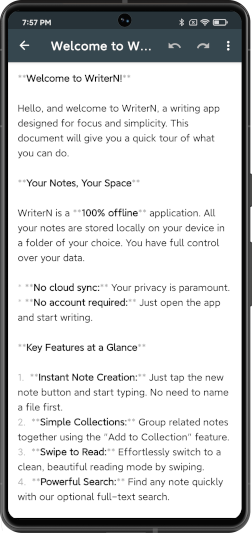
- Instant Note: Open the app and start writing. No need to name files first.
- Quick Access: Offers home screen widgets and QS tiles (Quick Note/New Note) to capture ideas anytime, anywhere.
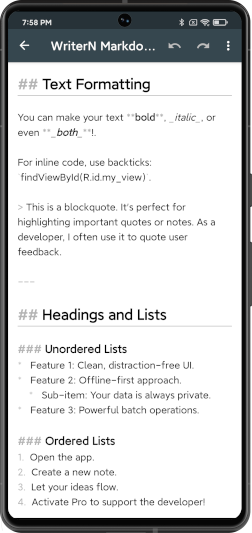
- Formatted Editing: See basic Markdown formatting as you type, without switching to a preview mode.
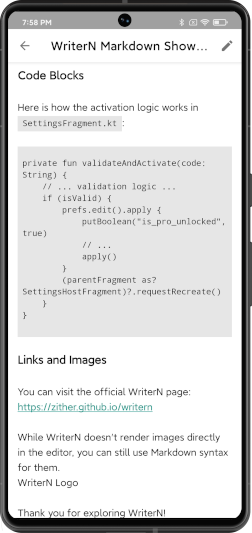
- Swipe to Read: Conveniently swipe left and right between documents for quick browsing.
- Fully Offline: All files are stored locally on your device. No internet permission required.
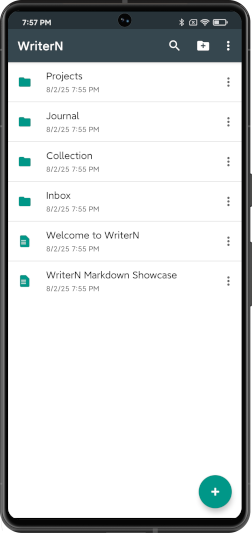
- Custom Directory: You can specify the folder where your documents are stored for easy backup and sync.
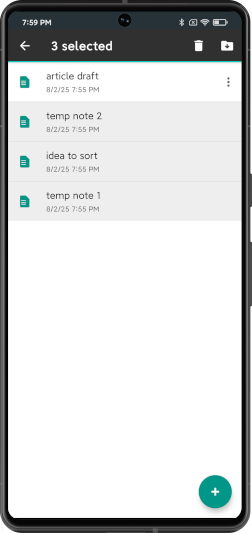
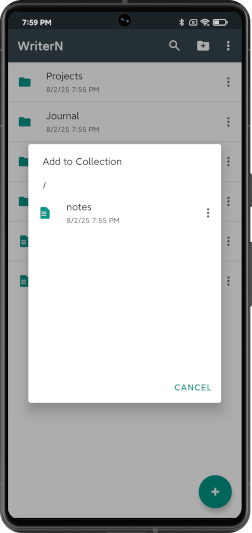
- Batch Operations: Supports selecting multiple files at once for moving and deleting.
- Optional Full-Text Search: Can be enabled in settings to search within document content, not just filenames.
Screenshots


About WriterN
As a long-time user of Writer Plus, I used it to manage all my documents and notes. As my collection grew, organizing them became increasingly difficult—it lacked features for batch moving and deleting, as well as a way to quickly swipe through documents. Since it hasn't been updated in years, these features would likely never be added.
So, in my spare time, I developed WriterN. It adds the efficient management and reading features I always needed, while striving to maintain the original's simple and clean interface.
Please Note: WriterN Pro is **functionally identical** to the free version. It does not contain any extra or exclusive features.
So, Why Get the Pro Version?
The Pro version is for users who wish to support the ongoing development of this project. As a token of appreciation, activating Pro adds a "Pro" badge to the app's title and displays a thank-you card in the settings page. Beyond that, there are no other differences from the free version.
You can think of purchasing Pro as buying the developer a cup of coffee—it's the most direct way to show your encouragement.
If you find WriterN helpful, please consider supporting it. Thank you!
Get WriterN Pro
Please scan the QR code below using WeChat. After payment, please send your **Instance ID** and a **screenshot of the receipt** to ilorn.mc@gmail.com.

Alternatively, you can find me in the Xianyu app by searching for the user "小小盆栽". After purchasing the dedicated link, please send me your **Instance ID** and your **email address** via Xianyu direct message.

For international users, you can show your support via PayPal. After payment, please send your **Instance ID** and a **screenshot of the receipt** (or the transaction ID) to ilorn.mc@gmail.com.
Proceed to PayPal(You can find and copy your Instance ID from the 'Settings - About' page in the app)
Version History
Current Version: 1.2.6
Last updated on August 31, 2025
Version 1.2.6
August 31, 2025
- Introduced smooth transition animations between pages for a more fluid user experience.
- Revamped the search experience with a cleaner UI and more intuitive navigation logic.
- Adapted for button navigation mode, fixing an issue where content could be obscured by the system bar.
- Added Dark Mode support for all home screen widgets, ensuring a consistent look with the system theme.
- Refined the color schemes for light and dark themes, and corrected display issues for several icons and the Quick Settings dialog.
Version 1.2.3
August 16, 2025
- Optimized theme colors, now featuring a pure white background in light mode and pure black in dark mode for a more immersive experience.
- After creating, modifying, or moving a file, the corresponding item will now automatically scroll into view and briefly highlight for clearer feedback.
- The floating action button on the list screen now hides automatically when scrolling down, providing more reading space.
- Redesigned all in-app dialogs for a consistent visual style and improved layout.
- Improved the "Select Collection" dialog, which now supports browsing subfolders and has optimized folder loading performance.
- Fixed the button color in the "Quick Note" QS Tile dialog to ensure visibility across all themes.
Version 1.2.2
August 12, 2025
- Adjusted the activation logic. an App Instance ID is now required to get a Pro activation code.
- Improved dark mode switching. You can now reliably toggle themes within the app, independent of the system setting.
- Tweaked some icon and text colors for better readability.
- The file selector for features like Quick Note will now correctly filter for and display only Markdown (.md) files.
- Fixed an issue where directory paths in settings could sometimes display incorrectly.
- Corrected an issue where the back arrow was incorrectly shown when opening the editor from a homescreen widget.
Version 1.2.1
August 10, 2025
- Fixed an incorrect scrolling range issue in the QS Tile quick dialog and optimized the scrolling experience.
- Adjusted the style of the divider in the sorting options dialog to make it more visible.
- Adjusted the default recommended size for note widgets to 2x2.
Version 1.2.0
August 9, 2025
New Features
- Homescreen Widgets: You can now pin your notes directly to your homescreen! Two styles are available: one with the title and content, and a content-only version. Tap a widget to jump directly into the editor.
- Dedicated Quick Note: Set any note as your "Quick Note" in settings. Access it instantly via a new Quick Settings (QS) Tile or an App Shortcut to quickly view or edit your go-to file.
- New Note QS Tile: The original Quick Note tile has been renamed to "New Note". It now focuses on creating a new note for rapid capture.
Fixes
- Fixed several navigation bugs when opening the editor from different entry points.
Version 1.1.1
August 7, 2025
New Features
- Sort Your Notes: Added a new "Sort by" option to the file list menu. You can now sort your notes by name, date, or size, with additional options for "folder first" and "reverse order".
- App Shortcuts: Long-press the app icon on your homescreen for quick access to "New Note" and "Search".
- Quick Settings Tile: Added a "Quick Note" tile to the Quick Settings panel. Tap it to instantly create a new note, without interrupting your workflow.
Improvements & Fixes
- Fixed an issue where the "Create Folder" icon was not displayed correctly in dark mode.
Version 1.0.3
August 6, 2025
- Fixed an issue where the document title was not displayed correctly when entering the editor from the reading mode.
- Removed the unnecessary action menu from the list in the "Add to Collection" dialog to improve UI clarity.
Version 1.0.2
August 3, 2025
- Removed all permission requests to ensure the app operates without any sensitive access.
- Fixed an issue where the last few lines of a long note were not scrollable in read mode.
Version 1.0.0
August 2, 2025
- ✨ Initial release!
- Core Markdown editing and reading features.
- Support for full offline mode and custom directories.